Rabab Tuner
A browser-based tuner using recorded audio and frequency detection.
Overview
When I was spending time with my teacher learning this instrument, I noticed how hard it is to tune it. It’s based on a non-classical musical notation called sargam - there are mappings to the classical notes but its not standardised. To the beginner, this would all seem very alien. I wanted to make this experience a little bit easier.
See me playing this instrument
Updates
Speeding things up
19 Apr 2026
The problem
Tuning feedback was too slow. The old pipeline recorded a 1 second blob with MediaRecorder, posted it to /analyze, and only started the next recording after the response came back. The backend then had to decode that blob with pydub, which is then sent to ffmpeg to be converted to the raw PCM samples. This was adding too much overhead and noticeable lag.
Streaming raw PCM over Socket.IO
The real fix was realising that I just need raw PCM samples, and I am able to do that directly with Socket.IO rather than relying on HTTPS.
HTTP forces a record-stop-upload-wait shape, and the next recording can’t start until the previous request finishes. A persistent WebSocket handshakes once and then frames just flow in both directions.
MediaRecorder now does not make sense. It’s designed to hand you a finalised encoded file, which is exactly the wrong thing when the server only wants floats. An AudioWorkletProcessor sits on the audio thread and gives direct access to the raw Float32Array samples.
class PCMProcessor extends AudioWorkletProcessor {
  constructor() {
    super();
    this.bufferSize = Math.floor(sampleRate * 0.2);
    this.buffer = new Float32Array(this.bufferSize);
    this.writeIndex = 0;
  }

  process(inputs) {
    const input = inputs[0];
    if (input.length === 0) return true;
    const channelData = input[0];
    for (let i = 0; i < channelData.length; i++) {
      this.buffer[this.writeIndex++] = channelData[i];
      if (this.writeIndex >= this.bufferSize) {
        this.port.postMessage(this.buffer.slice());
        this.writeIndex = 0;
      }
    }
    return true;
  }
}
I’m buffering about 200ms before posting — small enough to feel smooth, big enough for YIN to have reliable samples to process.
On the server, the whole pydub/ffmpeg step disappears. Decoding looks like this now.
samples = np.frombuffer(audio_bytes, dtype=np.float32)
A single line of code, incredibly simple.
Two things the stream exposed
If YIN ever runs longer than a chunk, frames start piling up. A flag per connection — drop new frames while one is still being processed — handles it. This does have consequences, in the worst case if YIN takes more than 200ms for every chunk, the server would drop every one. Our update rate would drop sharply and the tuner would feel choppy.
And because the connection is now bidirectional, results can come back in a different order than you sent the chunks (or arrive after you’ve already moved on to a different string). Tagging each chunk with an incrementing sequence number and ignoring any result that doesn’t match the latest one fixes that.
Neither of these were problems before, because HTTP was already enforcing strict one-at-a-time by accident. Streaming makes you do it deliberately but stays true to the ‘live tuning’ behaviour that is expected.
The big issue
The tuner is much more responsive. The problem is now the backend hosted on onrender, which for some reason terminates the worker thread. Because of this, any tuning currently happening halts and the tuner displays ‘connecting’. I have no idea why this is happening - maybe the free tier gives too little RAM for the process and terminates it when the process asks for more? I am not sure.
Upgrading the UI
30 Mar 2026
The problem
I am building a tuner, yet the UI is bloated with colours and fancy live waveform. It looks modern, but it doesn’t capture the essence of what I am trying to create. A simple tuner, that can tune a rabab to the bilawal scale.
Making the UI more approachable
The landing page shouldn’t take you to a screen that says “Let’s get your rabab tuned”, this doesn’t make sense at all. The user is already here to get their rabab tuned, adding a button that takes them to the tuner afterwards is just redundant.
Adding a tuning ‘gauge’ with a needle, and an image with the rabab makes more sense. After playing around with the css, this is what I have reached:
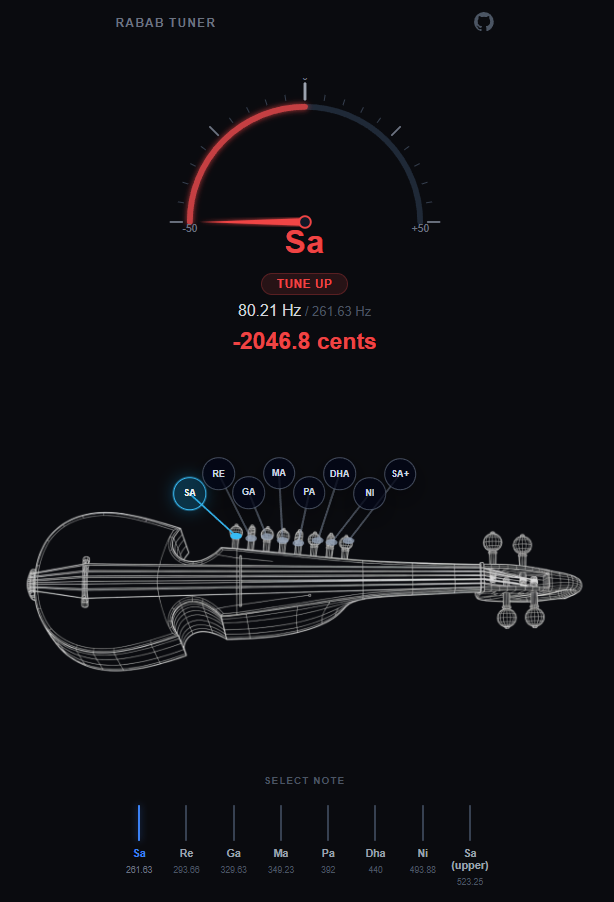
Now, the notes that are labelled on the rabab on the circles are not accurate. They shouldn’t be labelled at all as they are the sympathetic strings. I got AI to generate the wireframe rabab image with 8 sympathetic string knobs so I could label them with 8 notes that are being tuned. This needs to be changed, there are 3 or 4 main strings that need tuning which are the larger knobs at the top of the rabab.
Apart from the UI, the tuning response from the website is quite slow. I still need to fully implement YIN into the project rather than relying on the error-prone FFT.
Rabab Tuner: Understanding the YIN Algorithm
28 Jan 2026
I have started implementing YIN in tuner_core.py, but before doing so in the main project I needed a prototype that worked with artificial noisy signals and WAV audio files.
YIN fundamentally builds on ACF and adapts it into a difference function. When expanded and simplified, the difference function can be written using ACF terms, which makes implementation easier. But why switch to the difference function at all? ACF can prefer a lag that is too low, because small lags can maximize similarity between lagged and original signals.
Instead, the difference function starts with the idea that the difference between the original signal and a signal shifted by the true period T should be zero. Squaring and summing over the signal preserves this condition. In practice, we look for minima in this function because exact zero is unrealistic for real signals.
The next stage in the paper is still something I am building intuition for.
The difference function is zero at zero-lag and near zero at the true period, because real signals are not perfectly periodic. Resonance can create minima lower than the true-period minima, so picking the global minimum is not always correct.
The proposed fix is the cumulative mean normalized difference function (CMNDF). I implemented it in testing, but still want a deeper understanding of why it suppresses those misleading minima.
There are additional optimizations in the paper that I plan to implement. I also realized microphone audio is often stereo, while this signal-processing pipeline expects mono, so I need a preprocessing step before feeding audio to YIN.
Rabab Tuner: Change of Frequency Detection Algorithm
23 Dec 2025
My initial implementation of the Rabab tuner used FFT, and it felt like the obvious starting point. Now that I have it somewhat functioning, I notice how inaccurate FFT is for real, imperfect audio samples.
My main misunderstanding was trying to find the pitch using FFT. That is not its function; it presents frequencies present within a signal. I would take these frequencies and accept the strongest peak as pitch, the fundamental frequency (f0). However, f0 does not have to be the strongest component of the signal. Harmonics can dominate the spectrum, and noise and string resonances can introduce unwanted peaks. The lesson learned is that the greatest-magnitude FFT peak cannot reliably determine f0.
There are other issues as well, like frequency bins, which are discrete frequency intervals produced by FFT. Larger bin spacing leads to less accurate pitch estimates, and this depends on window length. If I need faster analysis, f0 detection can become inaccurate. If I prioritize accuracy, I need a longer window, which increases analysis time.
This is where the YIN algorithm comes in. I would describe it as based on autocorrelation with additional optimization. The error rate produced by this algorithm is far lower than traditional FFT methods for pitch tracking.
FFT asks which frequencies are present within a signal, but YIN measures the time it takes for the signal to repeat itself.